Publishers of technology books, eBooks, and videos for creative people
Register your product to gain access to bonus material or receive a coupon.
Adobe Photoshop Lightroom 2 Book, The: The Complete Guide for Photographers
- By Martin Evening
- Published Jul 29, 2008 by Adobe Press.
Book
- Sorry, this book is no longer in print.
About
Features
The Lightroom 2 Book Photo Shoot, Lightroom-NEWS.com
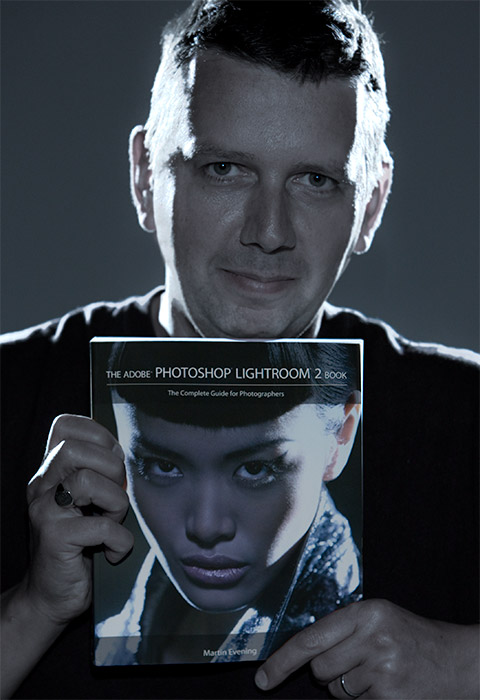
Martin Evening holding a copy of his new book
Description
- Copyright 2009
- Edition: 1st
- Book
- ISBN-10: 0-321-55561-9
- ISBN-13: 978-0-321-55561-8
While Adobe Photoshop has long been their choice for editing digital photographs, many photographers want a more focused tool. That’s where Adobe Photoshop Lightroom comes in. Designed from the ground up with digital photographers in mind, Photoshop Lightroom offers powerful editing features in a streamlined interface that lets photographers import, sort, and organize images. This completely updated and expanded bestseller, The Adobe Photoshop Lightroom 2 Book, was also written with photographers in mind. Author Martin Evening describes features in Photoshop Lightroom 2 in detail from a photographer’s perspective. As an established commercial and fashion photographer, Martin knows first-hand what photographers need for an efficient workflow. He has also been working with Lightroom from the beginning, monitoring the product’s development and providing feedback on the public beta. As a result, Martin knows the software inside and out, from image selection to image editing to image management.
The Adobe Photoshop Lightroom 2 Book contains 624 pages of comprehensive and detailed coverage of all aspects of Lightroom. In this book you’ll learn how to:
• Work efficiently with images shot in the raw or JPEG format
• Import photographs with ease and sort them according to your workflow
• Create and manage a personal image library
• Apply tonal adjustments to multiple images quickly
• Integrate Photoshop Lightroom with Adobe Photoshop
• Export images for print or Web as digital contact sheets or personal
portfolios
The book structure has been organized to match a typical Lightroom workflow. The introductory chapter provides an overview of all the main Lightroom features, showing how Lightroom 2 was used on a studio photo shoot that was specially shot to illustrate the book. The following chapters cover all the essentials, such as importing photos, working with the Library module, and managing the catalog database. The biggest section of the book is devoted to working with the Develop module and provides some unique insights into working with new features such as the localized adjustment tools. There is also a whole chapter devoted to image sharpening and another on integrating Lightroom and Photoshop, where you will learn how to devise the best workflow methods for working between these two programs. This is followed by a chapter on printing and a presentation chapter on the Slideshow and Web modules. Lastly, there are two appendix chapters. One offers a complete overview of the Lightroom 2 preference settings, while the other provides some in-depth explanations and background reading on how the Lightroom program works.
The book is richly illustrated, mostly using the author’s own photographs, and one of the nice features of this book is the way enlarged panel views are used throughout, making it easier for readers to follow the settings used in the various step-by-step examples. There are also lots of tips that will help you take your Lightroom techniques to an advanced level.
If you are looking for the most comprehensive coverage of Lightroom, written by an author who is closely involved with the development of the program, this is the book to get.
About the Author
Martin Evening is a London-based advertising and fashion photographer and noted expert in both photography and digital imaging. In addition to being a bestselling author, Martin is sought after for speaking and lecturing. He also works with the Photoshop and Lightroom engineering teams, consulting on new feature development and alpha and beta testing. He is one of the founding members of PixelGenius, a software design company producing automated production and creative plug-ins for Photoshop.
Extras
Related Articles
Basic Adjustments and the Histogram Panel in Adobe Photoshop Lightroom 2
Collections in Adobe Photoshop Lightroom 2
How to Create a Novelty Slideshow Template in Lightroom 2
Keywording in Adobe Photoshop Lightroom 2
Open Lightroom Photos as Smart Objects in Photoshop
Photo Filtering and Searches in Adobe Photoshop Lightroom 2
Photoshop as a Sandwich Filler for Lightroom 2
Saving and Reading Metadata in Adobe Photoshop Lightroom 2
Tethered Shooting in Adobe Photoshop Lightroom 3 Beta
Using Adobe Photoshop Lightroom 2 and Bridge Together
Vignettes and Post-Crop Vignettes in Adobe Photoshop Lightroom 2
White Balance Corrections in Adobe Photoshop Lightroom 2
Working with Develop Presets in Adobe Photoshop Lightroom 2
Sample Content
Online Sample Chapter
Managing Photos in the Library Module of Adobe Photoshop Lightroom 2
Table of Contents
1 Introducing Adobe Photoshop Lightroom
2 Importing photos
3 Navigating the Library module
4 Managing photos in the Library module
5 Working with catalogs
6 Develop module image editing
7 The art of black and white
8 Sharpening and noise reduction
9 The Photoshop connection
10 Printing
11 Presenting your work
Appendix A
Lightroom Preferences
Appendix B
Lightroom settings
Index
Updates
Errata
1st Printing
Page 561, Accessing saved template settings, 4th line from the top
“Username/Application Support/Adobe/Lightroom”
Should be
“Username/Library/Application Support/Adobe/Lightroom”